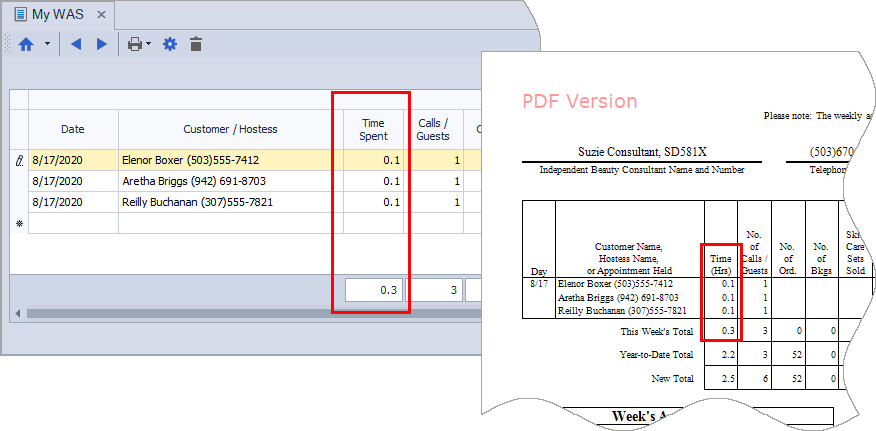
A single contact log entry can be created for multiple contacts at once by selecting them from the Customer, Address, Unit lists, or the List Builder. The entry is then applied identically to each selected contact, with options to add notes, update the Next Contact Date, and record time spent for Weekly Accomplishment tracking
From one of the contact lists (Customer, Unit, Address) or List Builder, select the desired contacts by clicking the checkbox next to each name.
- From the list toolbar, click
 Log Entry.
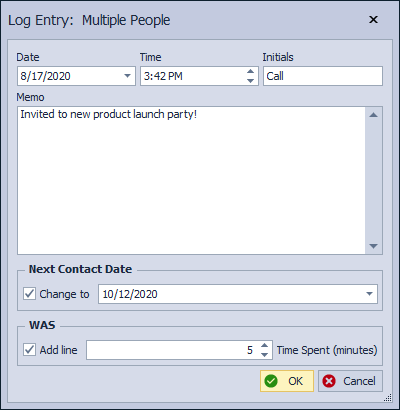
 - The form appears, with Log Entry: Multiple People displayed in the title bar.
- You can customize the note any way you like. For example, instead of putting your initials, you could put the word, Call in the Initials field.
- Choose whether to move their Next Contact Date further in the future in the Calendar by clicking the Change to checkbox and selecting a future date from the date picker. (You'll want to use this option if you're sending an email, and would like to follow-up with a phone call.)
- Last, under WAS, click the Add line checkbox and enter the amount of Time Spent (in minutes).
- Click OK to accept and close the form.