The List Builder creates custom contact lists by filtering, sorting, and selecting contacts based on specific criteria. Lists may be saved for future use, edited, or exported, and can be used for tasks such as printing labels, generating reports, or preparing targeted communication. The List Builder helps organize contacts into focused groups for follow‑up, marketing, or other business needs.
Options:
From the main toolbar, select  Contacts, then
  Builder (or from the Contacts menu, select List Builder).
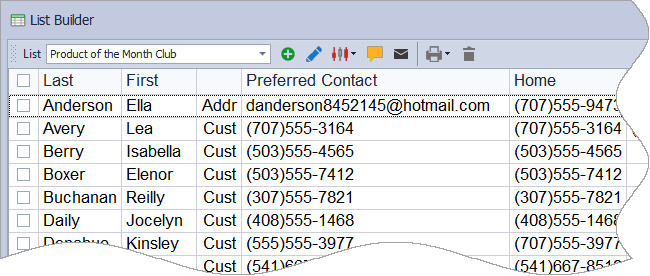
Toolbar
- List: Displays the contacts included in the specified list. Select a list in the box to view, edit, or delete it.
-
 : Select to create a new list.
 -
 : Select the list to edit from the List drop-down, then click this button to edit the list.
 -
 : Select the list to delete from the List drop-down, then click this button to delete it.
 -
 : Add or remove columns from the list displayed, or reset to the default columns
 -
 : Create an entry in their Contact Log.
 -
 : Send an email to one contact, or a group email if multiple contacts are selected.
 -
 : Choose to print a report, or mailing labels.
List Filters
When creating a new list or editing an existing list, you can choose to view only certain groups of contacts from the Show drop-down options.
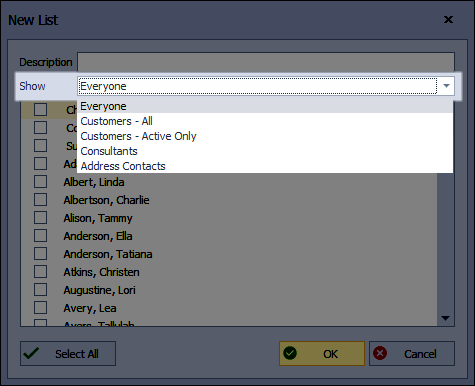
- Everyone: Displays contacts from all three lists.
- Customers All: Displays active and inactive contacts on the Customer list.
- Customers Active Only: Displays only the contacts from the Customer list that are not marked inactive.
- Consultants: Displays all consultants located on the Unit List.
- Address Contacts: Displays all contacts located on the Address List.
Right-click menu

- Edit: Launches the contact's profile
- Remove Name from List: Removes the name from the current name list
- New Invoice: Launches a new invoice for the contact
- Invoice History: Launches the contact's profile opened to the Account & Invoice tab
- Product History: Launches the contact's profile opened to the Products tab
- Call History: Launches the contact's profile opened to the Contact Log tab
- Account Balance: Launches the contact's profile opened to the Account & Invoice tab
- New Appointment: Creates a new appointment
- New Action Item: Creates a new action item (single)