A payment made at the time of purchase can be recorded directly on the invoice by entering the amount into the appropriate payment field—such as cash/check, credit card, or gift certificate. If the full amount is entered, Boulevard will prompt whether to include any previous balance or credit. Payments made after the invoice date should be posted to the account instead, ensuring the actual payment date is accurately recorded.
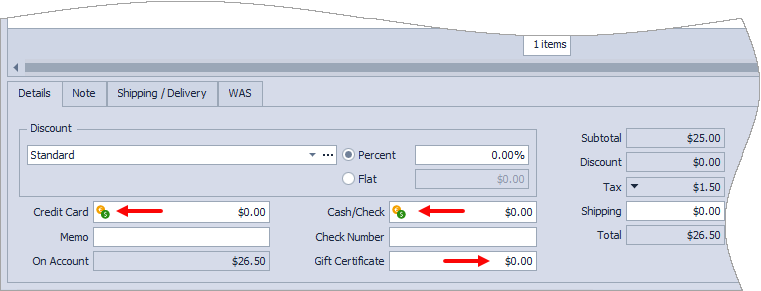
If the invoice is being paid in full, click  in the field of the payment method used. If there is a previous balance or credit on account, Boulevard will prompt to ask if you'd like to include that with the current payment.
Alternatively, if the customer is not paying the entire invoice amount or is using a gift certificate, enter the payment amount in the appropriate payment method field.
When finished, click  Save to save and close the invoice.
Additional Information:
Note: It is not recommended to edit an invoice to apply a payment; instead post a payment to their account to reflect the actual payment date.