The Profit & Loss Statement summarizes income and expenses for a selected date range, organizing totals by category to show overall profitability. It can be printed or exported and is intended to complement the recommended year‑end tax reports by offering an additional high‑level view of business performance.
From the Business Tools menu, select  Profit & Loss.
Enter a date range to view applicable information.
Sections:
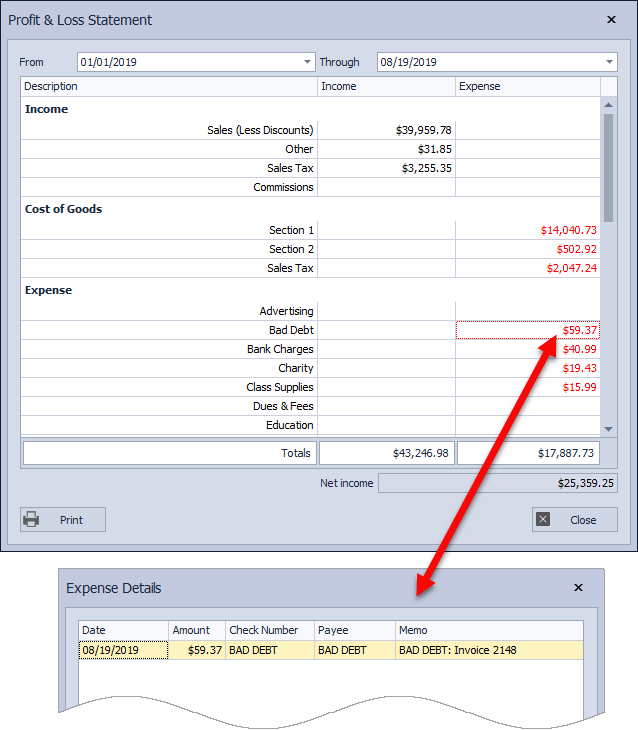
Income
Any Expense categories that are set as Income will also be included.
- Sales (Less Discounts): Retail sales less discounts applied from invoices
- Other: Shipping collected on invoices
- Sales Tax: Tax collected on invoices
- Commissions: Commission information entered in Expenses
Cost of Goods
See Year-End: Product Purchases (Inventory Orders) for detailed information about the Received orders included.
- Section 1: The wholesale cost of retail products purchased from inventory orders that have been received into inventory
- Section 2: The cost of supplies purchased from inventory orders that have been received into inventory
- Sales Tax: The amount of tax collected by the company for the inventory purchased
Expense
Double-click the amount shown in red for each category to view the Expense Details dialog for expense entries included (as shown in the image above).
- All categories that have been created (but not necessarily used) from the Expense area in Boulevard.
Additional Information:
- Individual entries for any expense category can be viewed by double-clicking on the amount shown in the Expense column (or right-click and select Drill Down).
- To print a listing of individual transactions from a specific category, we recommend printing the Expense Listing by Category, which can be accessed from Expenses.
- Expense Categories, Payees & Filters
- Close Year-End & Run Tax Reports
- Year-End Guide & Checklist