The Product Purchases report shows the wholesale total of products purchased for inventory or direct‑shipped to customers within a selected period. It includes key details such as Date, Description, Wholesale (Section 1), Supplies (Section 2), All Other Sections (e.g., Section 5), Tax, and Additional Discount.
Note: Only closed orders with the status of Received will be included in the report. From the Inventory Orders grid (select the Product menu, then Inventory Order), right-click and choose Close to set an order as received without changing your current inventory. View
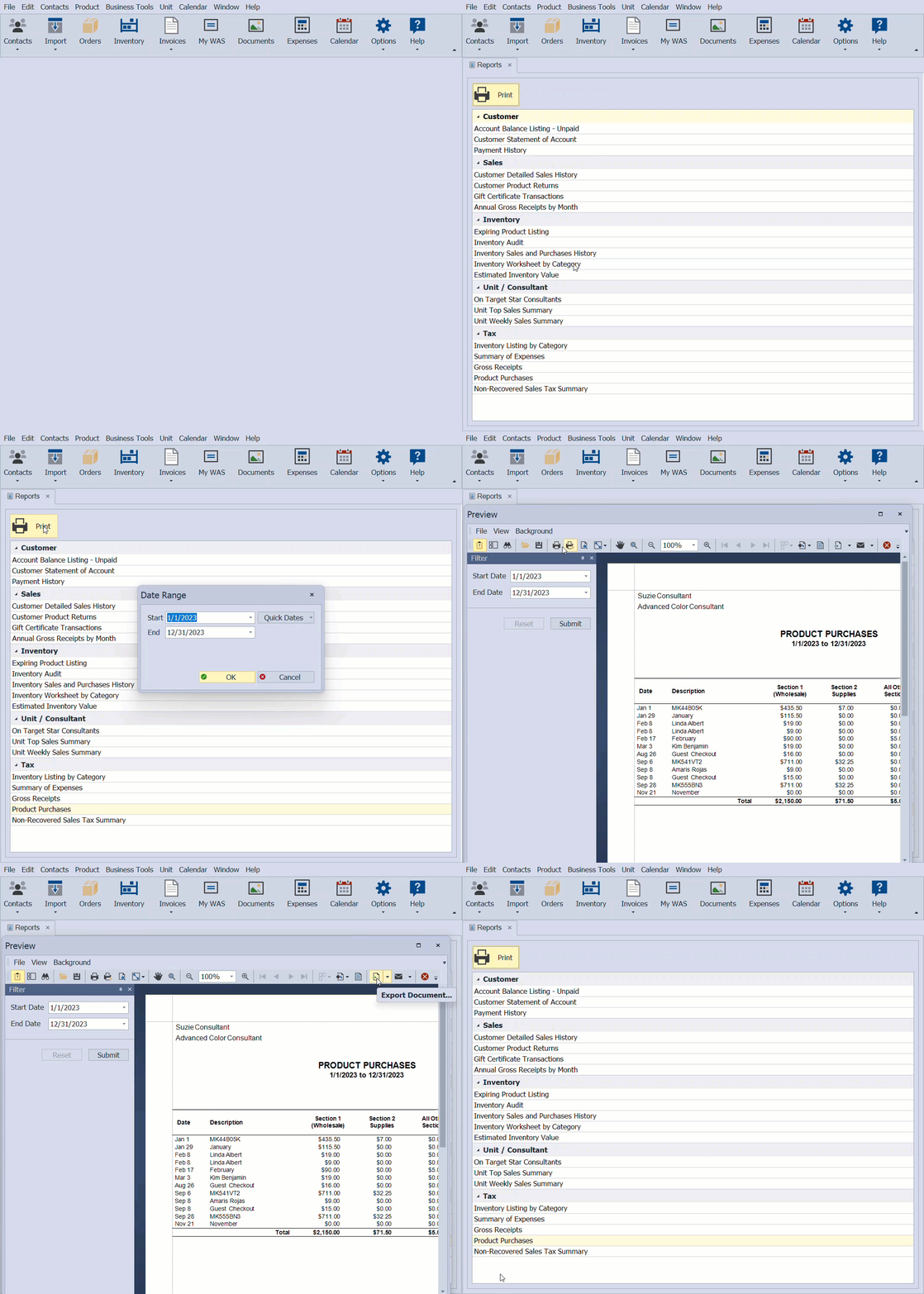
From the Business Tools menu, select Reports.
- Under the Tax section, select the Product Purchases report, then select
 Print (or double-click on the report).
 - Enter the date range to print, then click OK.
- From the preview window, click the print button
 to print (or export button
  to export as a pdf).

Additional Information:
If you have orders with totals that are not correct (including Direct Ship or Guest Checkout), first, set your Default Discount for future orders, then edit the totals to make any necessary adjustments for past orders.
- If you need to add past product orders without changing your current inventory, see Record Historical Orders Without Affecting Inventory.
- If you have an order with a Received status that needs the totals adjusted, see Edit an Inventory Order, then Set Default Wholesale Discount for Inventory Costs.
- Year-End Guide & Checklist
- Close Year-End & Run Tax Reports