Borrowing an item increases your on‑hand inventory by the borrowed quantity and records the transaction under the Borrowed field for that product. Items may be borrowed from any contact, including unlinked names, and Boulevard tracks them until they are returned or otherwise cleared.
From the Product menu, select Loan/Borrow & Exchanges.
- From the toolbar, click
 Borrow.
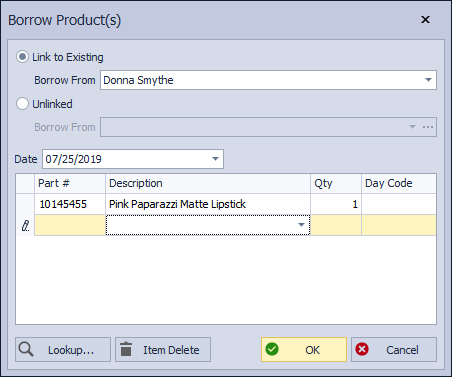
 - In the Borrow Product(s) form, begin typing the name of the contact you are borrowing the items from (if the contact does not have a profile in Boulevard and you do not want to create one, use the Unlinked option to enter their name).
- If necessary, change the date of the transaction in the Date field.
- Add each item to a new row by either entering a part number, partial description, or Lookup.
- If necessary, edit the quantity for each item in the Qty field (and optionally, add the day code in the Day Code field).
- If you need to delete an item from the list, select it and click Item Delete.
- Click OK to save and close the form.
Additional Information:
When you borrow a product, the amount is added to the Borrowed field on the product profile and included in the On Hand amount.
