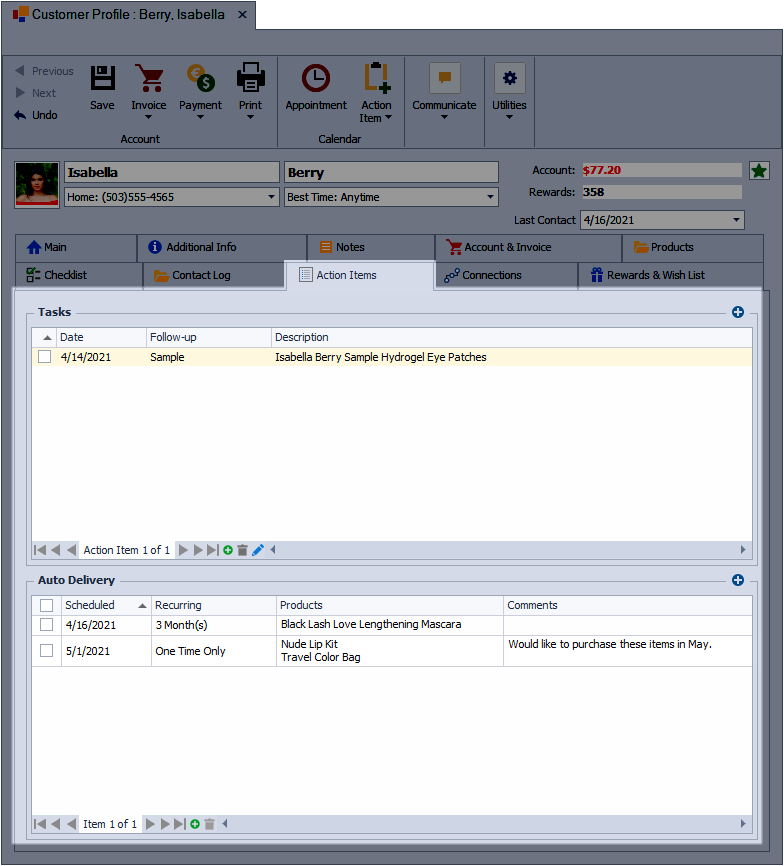
The Action Items tab on a contact profile lists all tasks and auto‑delivery items associated with that contact. Tasks can be upcoming or past due and show their due date, follow‑up type, and description, while auto‑deliveries display the next scheduled date, frequency, included products, and any notes. Both tasks and auto‑deliveries also appear in the Calendar and Upcoming Events, keeping follow‑ups and scheduled deliveries easy to track.
Sections:
Tasks
-
 : Select to create a new action item.
 -
 : Image indicates the item is a task (the image is not selectable; double-click or select the edit button to make changes to the task or right-click for additional task options)
- Date: The due date for the task
- Follow-up: Indicates the type of task which can be a default Follow-up type or create a custom Follow-up type.
- Description: The description of the task usually includes the name of the contact.
-
 : Create a new action item.
 -
 : Delete the selected action item.
 -
 : Edit the selected action item.
Auto-Deliveries
-
: Add a new auto-delivery.
-
: Used to select and delete all auto-deliveries (or right-click to invoice for the scheduled delivery or for additional options)
- Scheduled: The date of the next scheduled auto-delivery.
- Recurring: The frequency of each delivery or to keep track of a future one-time purchase (One Time Only, Days, Weeks, or Months)
- Products: The items included in the delivery.
- Comments: Include any additional information pertaining to the delivery.
-
: Add a new auto-delivery.
-
: Delete the selected auto-delivery.