The Main tab displays key contact information, including name, address, phone numbers, email fields, birthdays, and preferred program settings. It also provides quick access to communication tools, invoice history, and basic profile details used throughout Boulevard, serving as the primary overview for managing and updating a contact’s core information.
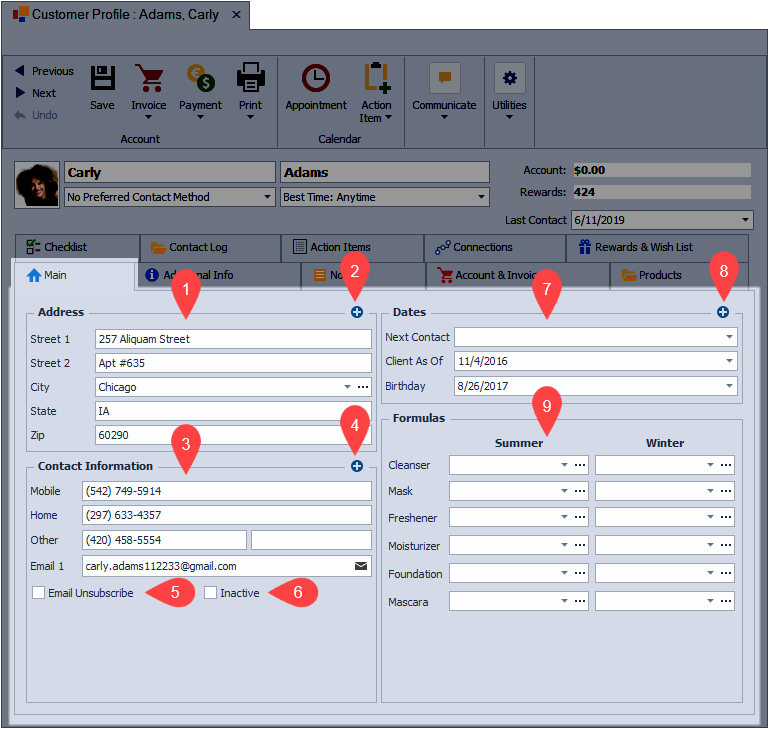
Sections:
Address
- (1): By default, when creating a new profile, the Street 1, City/Town, State/Province/County, and Zip/Postcode (field labels vary depending on your country) will be displayed.
-
(2): Click
 to add Company, Family Name, Street 2, or Country.
Contact Information
Note: When saving a profile, Boulevard will perform a validation check on all email fields to ensure the format is correct. A message will appear, and an error indicator  will be displayed next to the email address field if an incorrect format is found. The email address will need to be corrected or removed to save the profile. View
- (3): By default, when creating a new profile, the Mobile and Email 1 will be displayed.
-
(4): Click to add Home Phone, Work Phone, Other Phone, FAX, Email 2, or Language.
- (5): Select the Email Unsubscribe checkbox to never include this customer when creating group email messages.
- (6): Select the Inactive checkbox to set the customer profile (or consultant profile) as inactive. Inactive profiles are filtered by default, from the customer and unit lists.
Dates
- (7): By default, when creating a new profile, the Next Contact, Client As Of, and Birthday will be displayed (consultant profiles will not display the Next Contact by default but will display MK Anniversary).
-
(8): Click to add PC Program, Wedding Anniversary, or Interviewed Date for customer or address contact profiles. For consultant profiles, click to add Next Contact, Last Contact, Wedding Anniversary, PC Program, or Training Pkt.
Formulas/Production
- (9): For customer profiles, add up to 25 characters under the Summer and Winter options for Cleanser, Mask, Freshener, Moisturizer, Foundation, and Mascara can be added (this area is hidden on address contact profiles and will appear if the contact is moved to the customer list).
- Consultant profiles will display the Production section instead of Formulas. Production can be manually entered or imported.
Additional Information:
Tip: Click ... to change field information for all profiles at one time (to correct misspellings, etc.). Begin typing to choose from a previously added entry or click  to select from the options listed.