Clearing on‑hand inventory amounts lets you reset product quantities from the On Hand field in Boulevard. This is useful when starting a new fiscal year, correcting negative counts, or completely removing all stock levels.
Options:
-
All
Removes the quantity in the On Hand field for all sections. -
Retail Products
Removes the quantity from the On Hand field for all sections except section 2. -
Supplies
Removes the quantity from the On Hand field for section 2 only. -
Negative On Hand amounts
Removes only negative quantities from the On Hand field in all sections.
Note: Before clearing your current inventory amounts, we recommend taking a backup first.
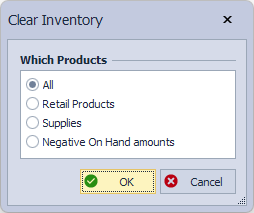
- From anywhere in Boulevard, press Ctrl + Alt + J on your keyboard to open the Clear Inventory dialog.
- Under Which Products, choose either All, Retail Products, Supplies, or Negative On Hand amounts, then click OK.
- Click Yes to confirm removing on-hand amounts for the option selected.

Additional Information:
- To re-enter your current on-hand amounts, see Print Inventory & Make Adjustments or Entering Your Base Inventory.