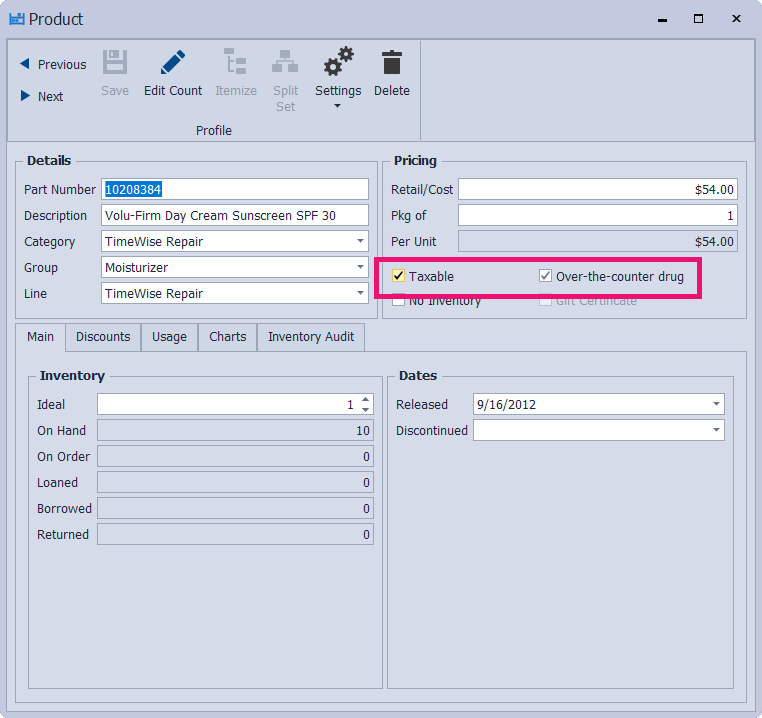
When an Inventory Order is added to Boulevard, having items correctly marked as Taxable or Over‑the‑counter drug allows Boulevard to handle them properly and match the tax totals from the company’s Order Status/History or your packing slip, ensuring the right items are taxed. This also makes sure you charge the correct tax amount when selling to customers.
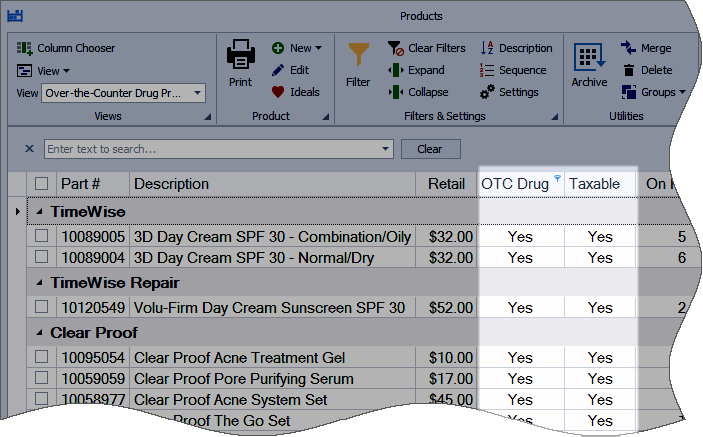
When you load a product update, Boulevard will give you the option to Mark over-the-counter drug products non-taxable if applicable in your area. You can also load the Over-the-Counter Drug Products view in the product list to quickly view and make changes to those specific items.
Options:
Import Over-the-Counter Drug Products View
From the main toolbar, select  Inventory (or from the Product menu, select Product List).
Import Over-the-Counter Drug Products View
From the product list toolbar, click  View Options, then select
  Import. Choose the Over-the-Counter Drug Products view, then click OK.

Over-the-Counter Drug Products View
Mark an Item as Non-Taxable
Additional Info:
-
 MK Sales Tax Exemptions (Provided as a reference only. As new products are released, we encourage you to check with MK for an updated listing.)
- Balance the Totals on an Inventory Order