A reward program lets customers earn points based on their purchases. After turning on Track Rewards in the Reward settings, you choose how many points are earned for each dollar spent and how much each point is worth when redeemed. Once set up, points are added automatically and saved to each customer’s profile, where they can be used toward future purchases according to your earning and redemption rules.
Quick to implement and maintain; just decide how many points will be earned for each dollar spent, and the redemption rate per point.
From the main toolbar, select  Options, then under Settings, select
  Reward (or from the Edit menu, select Settings, then Reward).
- Ensure that Track Rewards is selected.
- Under the Earning section, enter the number of points that will be earned per denomination (Example: For every dollar purchased, the customer will earn 1 point. See additional examples below.)
- Under the Redemption section, enter the Redemption Rate or the amount each point is worth.
- Click OK to accept and close the form.
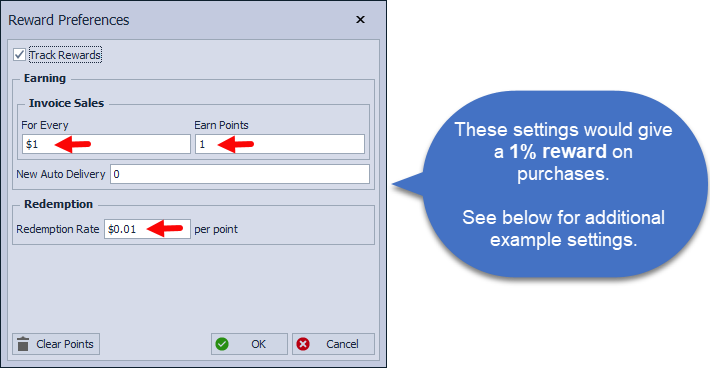

Example Settings:
Example 3 illustrates how to establish incremental rewards. It is important to note that the purchase threshold is set higher. Customers who place orders under $25 will not earn any points. If a customer spends more than $25 but less than $50, they will earn 500 points.


Additional Information:
- Additional points can also be earned based on Product Sales Events, completed Checklist items, and new auto-deliveries.
- Add, Move, or Hide Columns on the Customer List to add the Reward Points or Currency columns.
- See Import a View for Reports, Labels, & More to import a Rewards view to the customer list.
- To display Reward balances (either points or currency equivalent) on invoices, see Customizing Invoices & Adding Images.
- Filter Contacts by Reward Points
- View the past webinar covering the Rewards Program feature shown using a previous version of Boulevard, however the information is still great!