After your shipment has been delivered, the final step in updating your inventory amounts is when the product order Status is set to Received. The On Hand field will then reflect the quantities for each item ordered.
Before proceeding, ensure that the order totals match the packing slip received from the company and that the order Status is Placed. See Inventory Order Statuses for more information.
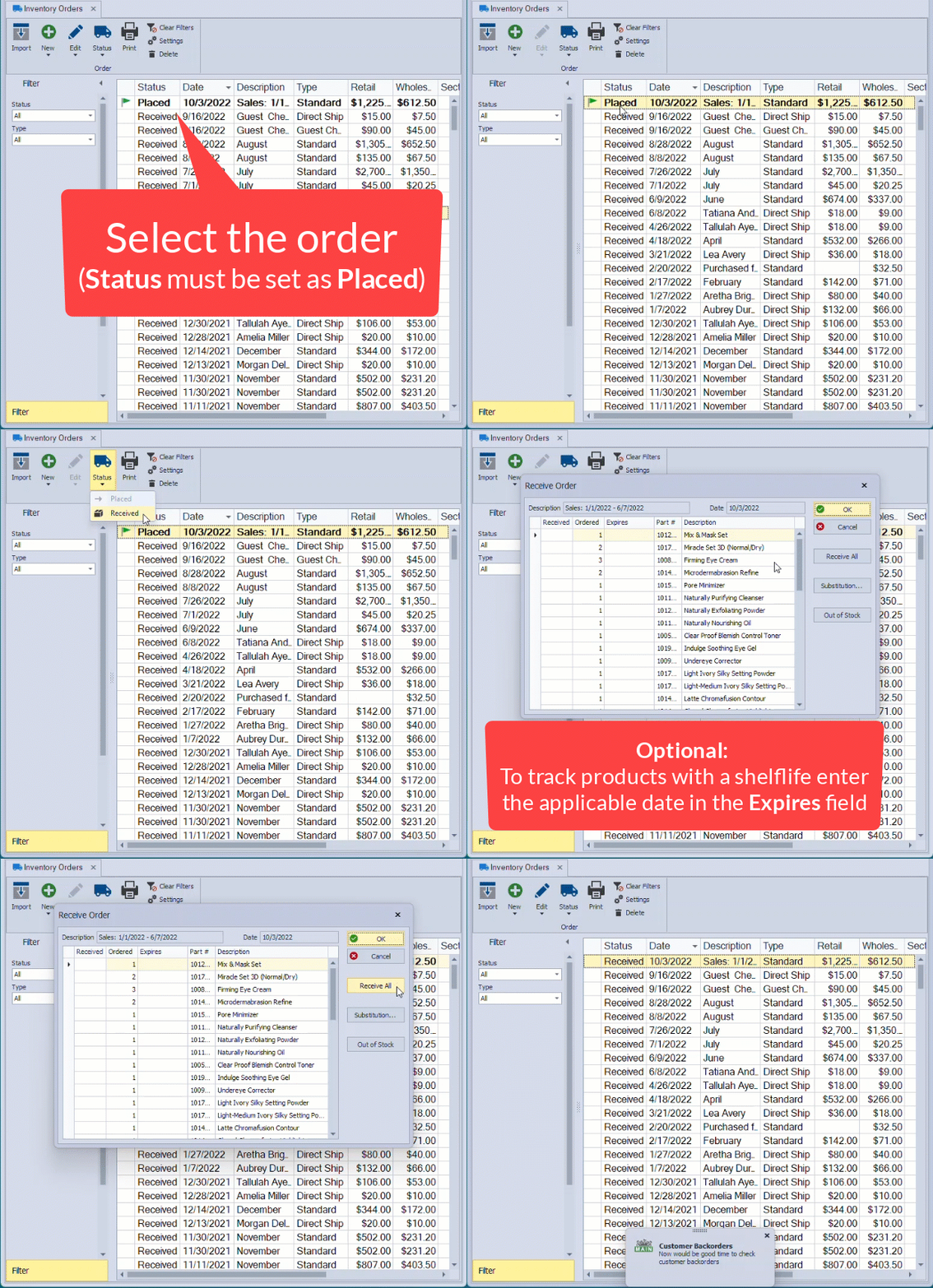
From the main toolbar, select  Orders (or from the Product menu, select Inventory Order).
- From the list of orders, ensure that the correct order is selected. From the toolbar, click
 Status, then Received from the drop-down options.
 -
If all items ordered were included in the shipment, click Receive All, then OK. If you track backorders, a notification will appear as a reminder to check for customer backorders.
Optional: To track the life cycle of products that expire, the equivalent date from the day code listed on the product can be entered in the Expires field. Refer to the MK Day Code Guide or the InTouch website for help in determining the correct date. View
Additional Information:
Handling Out-of-stock items and substitutions:
- Out of Stock: Select the item, then click Out of Stock for any items not included in the order that the company has determined are out of stock and will not be shipped.
- Substitutions: Locate and select the product originally ordered, then click Substitution. Use the Item Lookup form if needed, then select the item that was shipped instead, and double-click it to add it to the Receive Order form. Continue adding items from the Item Lookup form until you have accounted for all substitutions. When finished, click Close. Substituted items will appear italicized at the bottom of the order. Ensure the correct quantities are entered in the Received and Ordered fields.
- Backordered Products: For items currently on backorder but expected to ship, after clicking Receive All, override the quantity in the Received field to zero, then click OK to receive all other items. The order will remain in a Placed status, with only the products awaiting arrival listed in the Receive Order dialog. All other items will disappear, and quantities will be added to your inventory.