Mark an Item as Non-Taxable
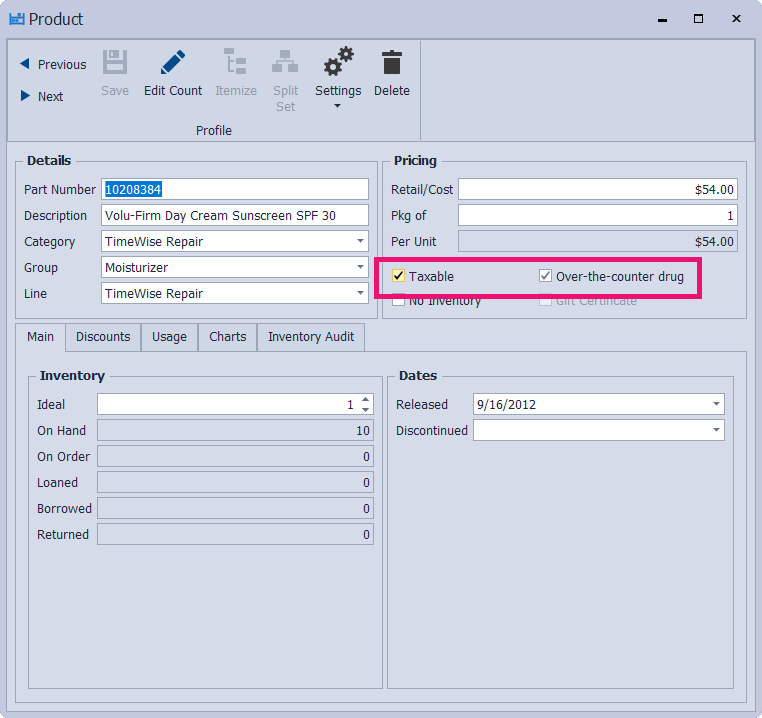
Any item in Boulevard can be marked as non-taxable to account for states where tax is not charged on certain items, such as items containing SPF, and whether the item is an over-the-counter drug product.
- From the main toolbar, select
 Inventory (or from the Product menu, select Product List).
- In the search field (also known as Find Panel), type a unique part of the item's description (or partial part number), such as Day Cream for Volu-Firm Day Cream Sunscreen SPF 30. View
- Double-click on the item to open the product profile. Under the Pricing section, choose whether the item is Taxable (for Canada, select Settings, then Advanced Settings).
- When finished, select Save.
Additional Information:
-
 Sales Tax Exemptions (Provided as a reference only. As new products are released, we encourage you to check with MK for an updated listing.)
- Over-the-Counter Drug Products