The Settings in a contact’s profile lets you set defaults that apply only to that individual, such as a default discount, a custom sales tax rate, invoice‑emailing preferences, follow‑up timing, and an optional shipping address. You can also mark options like Favored Customer, Potential Consultant, or Uses Basic Skin Care.
Contact Profile Settings:
These settings override the options set in Preferences when creating invoices or managing the contact.
Discounts: Specify a Standard discount or Birthday discount that will be used when creating an invoice.
Sales Settings: Invoice Followup, Email Invoice, Sales Tax, and Tax Shipping.
Invoice Ship To: Add a secondary address to their profile with a Default option to specify if it should be used when invoicing, and the Delivery Distance, used by the Trip Log.
Options: Additional options include settings that can be enabled for Favored Customer, Potential Consultant, Uses Basic Skin Care, and Exclude from the Dashboard.
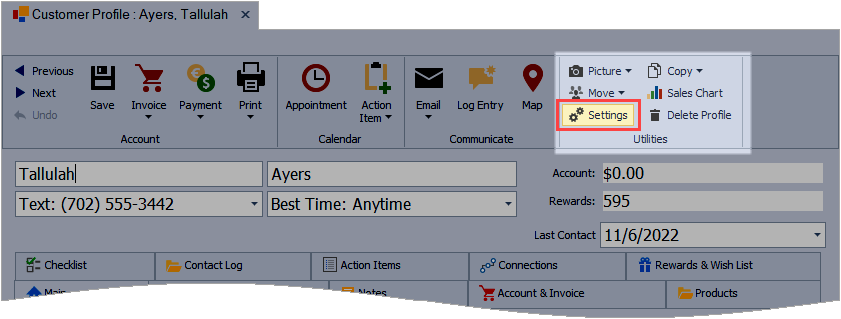
From the profile toolbar, in the Utilities group, click  Settings.
Discounts
- Under the Discounts section, if setting a Standard discount, from the drop-down list, choose a Discount Type, or click ... to add a new or edit an existing type.
- Enter the discount percentage in the Standard discount field.
- If setting a Birthday discount, from the drop-down, uncheck Use Preferences, then enter the discount percentage in the Birthday discount field.
- Click OK to accept and close the form, and if prompted, click Yes to save the profile.

Standard: The default is Use Preferences, which is Standard. Other default types include Personal Use/Own Use*, Indigenous Peoples*, Hostess Credit, Birthday/Anniversary, or Business Supplies. The default types cannot be deleted; however, additional types can be created. * Applies to the Canadian version only.
Birthday: The default is Use Preferences to automatically apply a discount during their birthday month that is set in Preferences: Invoice tab.
Sales Settings
- Invoice Followup: A system-generated calendar entry is created for customer follow up (in days) after the customer is invoiced if different than what is set in Preferences: Invoice tab.
- Email Invoice: Select an option to email invoices if different than what is set in Preferences: Invoice tab (an email address needs to be stored in the Email 1 field on the profile).
- Sales Tax: Set a custom sales tax rate that is different than what is set in Preferences: Business Info tab (or the Tax tab for the Canadian version).
- Tax Shipping: Specifies whether tax is calculated on shipping if different than what is set in Preferences: Invoice tab (or the Tax tab for the Canadian version).

Invoice Ship To
- Default: Select the checkbox to use an invoice shipping address as default. Specify the shipping address in the textbox if different from the address stored on the Main tab of their profile.
- Delivery Distance: Set the delivery distance when creating an entry in the Trip Log or if added from the Shipping/Delivery tab on an invoice.

Options
- Favored Customer: This can be set if the contact is a favored customer. The Favored setting can be filtered from the Customer List.
- Potential Consultant: This can be set if the contact is a potential consultant. The Potential Consultant can be filtered from the Customer List.
- Uses Basic Skin Care: This can be set if the customer regularly uses one of the basic skincare lines. The Uses Basic Skin Care can be filtered from the Customer List.
- Exclude From Dashboard: Set this option to exclude the customer in the dashboard's Top Customer List (typically used for personal use and business supplies profiles).
